
Diagnostics
Test the customer’s PC before handing it back.
MBI Clone’s “Diagnostics” screen brings together what a workshop checks on a PC: the health, surface and speed of each disk, and its erasure; the battery wear of a laptop; a test of the processor, RAM and graphics card under load; the blue screens recorded by Windows, explained to the customer and to the technician alike. Each check ends with a colour-coded verdict, and its results can be printed for the customer.
The whole PC on a single screen.
- Disks of this computer: health, surface scan, speed and erasure, for each connected disk.
- PC battery: how much of its original capacity it keeps, compared with batteries of the same model.
- Full test: the processor, RAM and graphics card under load, in 15 minutes or one hour.
- Blue screens: each crash recorded by Windows, in plain words, with the driver at fault and what to do.
Disk health
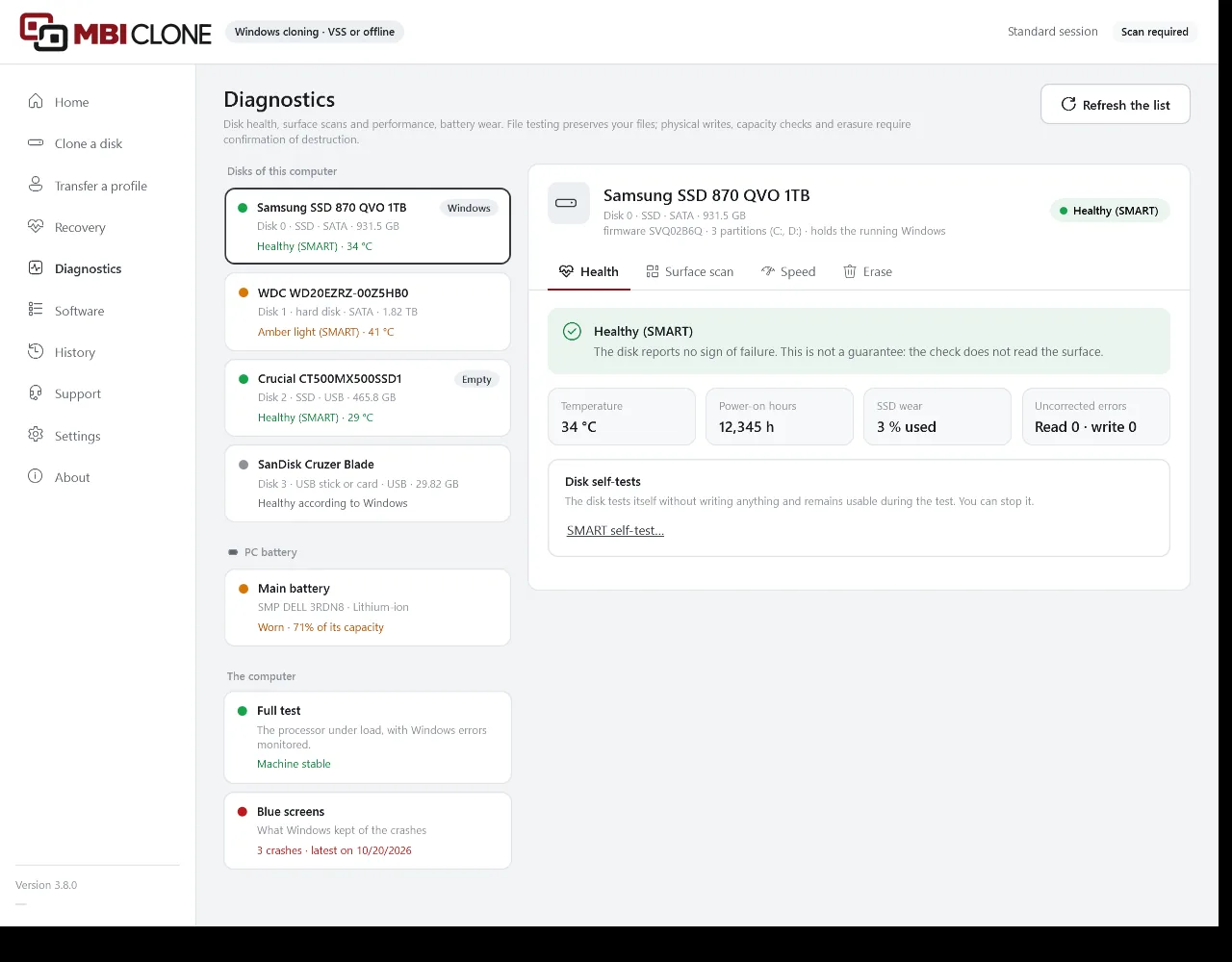
The health of each disk, read without writing anything.
Each disk has a green, amber or red light, and a sentence saying what to do; the light is grey when nothing allows a conclusion. Next come its temperature, power-on hours, wear and uncorrected errors, then the details of its SMART attributes, or of its health log for an NVMe SSD.
- SATA disks connected directly, and NVMe SSDs, including in a JMicron, ASMedia or Realtek USB enclosure, using only the commands that are safe for that enclosure. Behind Intel RST (VMD), an NVMe SSD is read through its health log.
- For a Seagate hard disk, its actual hours (FARM log) and the hidden area at the end of the disk: one more line, without changing the light.
- An Intel Optane H10 or H20 module is flagged: in a USB enclosure, only its SSD can be read, and the most recently changed files may exist only in its Optane memory.
- “SMART self-test…”: short (about two minutes) or long, the disk tests itself without writing anything and remains usable. Offered for a disk with a green light, and can be interrupted.
- The health assessment is reviewed in the light of the SMART readings shared by workshops: “Share the SMART reading” sends MB Informatique what the disk reported about its health, with its model and firmware, never its serial number.
Surface and speed
The surface read square by square, the speed measured with no risk to the files.
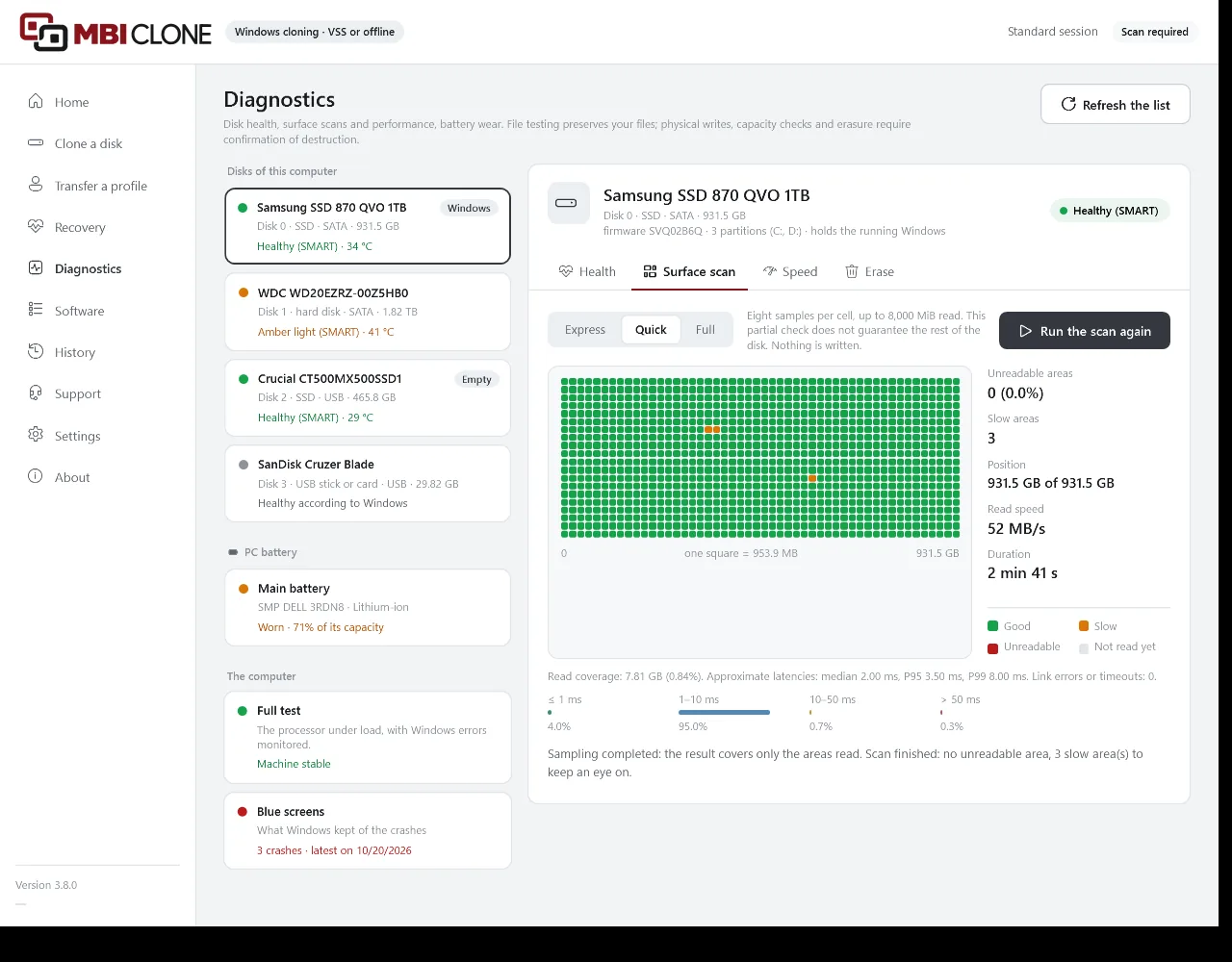
The surface scan reads the disk without writing anything and draws it as squares: good ones in green, slow ones in amber, unreadable ones in red. The speed test runs on a file, the Windows disk included, or across the whole disk. A disk with an amber or red light is neither scanned nor tested: the screen suggests making a rescue image.
Express, Quick or Full
“Express” reads one sample per square, about 1 GB in total; “Quick” eight samples per square, about 8 GB; “Full” every sector. At the first unreadable area, the scan pauses and offers “Make a rescue image”.
On a file, with DiskSpd
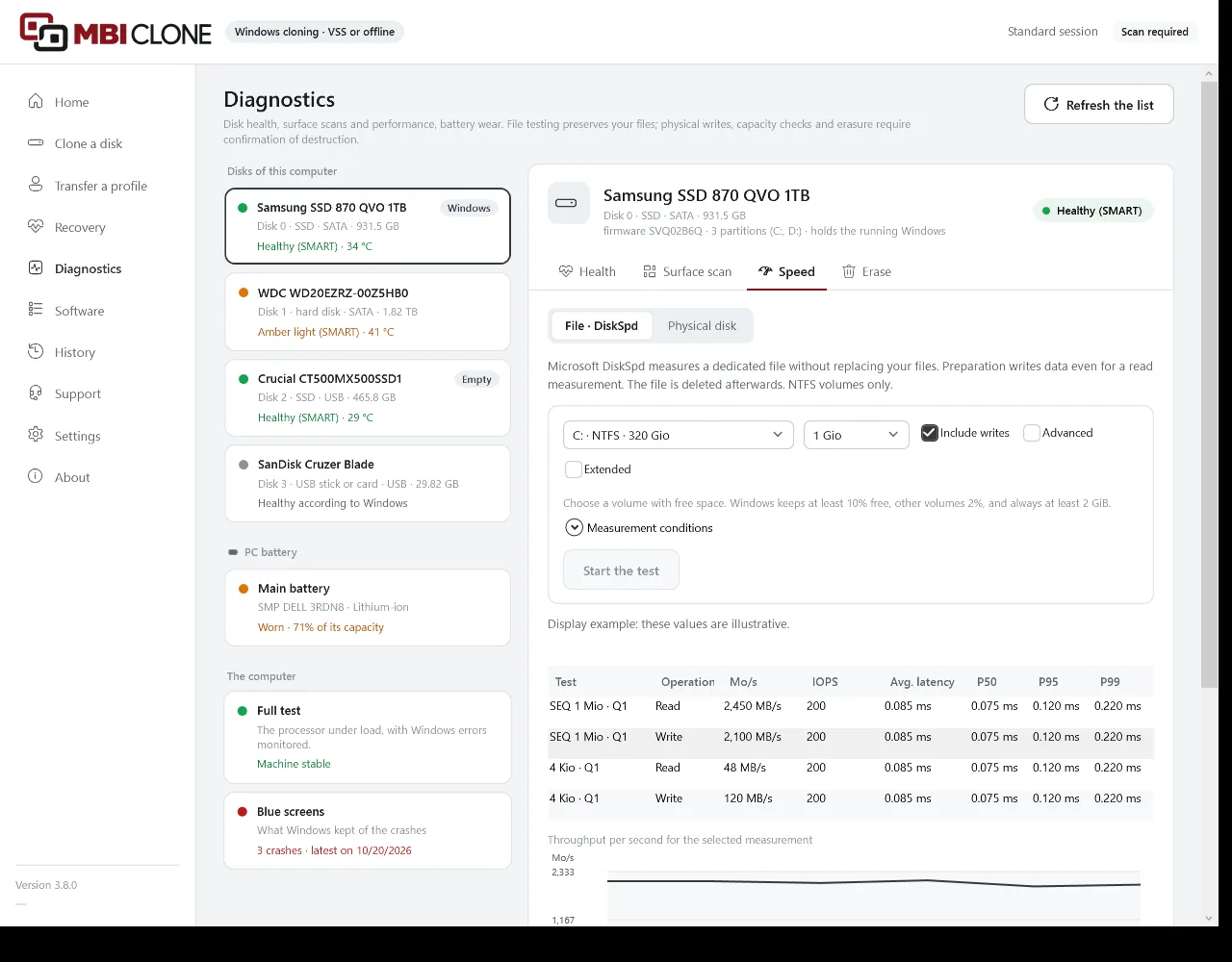
On an NTFS volume, Microsoft’s DiskSpd measures a 1, 4 or 16 GB test file, deleted at the end: throughput, operations per second and latencies, for reads and, if you tick it, for writes. Your files stay in place. The test stops if the disk reaches the critical temperature it reports.
Across the whole disk
“Physical disk”: a read curve across the whole surface, with access time. Writing is only allowed on an empty disk, with no partitions, never on the Windows disk, after a confirmation; the written areas are zeroed afterwards.
Real capacity
Exposes a disk that lies about its capacity, sold as 2 TB when it only keeps 32 GB: marked blocks are written over the whole medium, read back, then zeroed. Only on an empty medium whose hardware identity is reliable: USB sticks and memory cards in a reader cannot be checked this way.
“Share the result” sends MB Informatique the disk’s model, firmware, capacity, connection and speeds, never its serial number; MBI Clone then shows where it stands among disks of the same model.
Erase
Erase a disk before handing it back or reselling it.
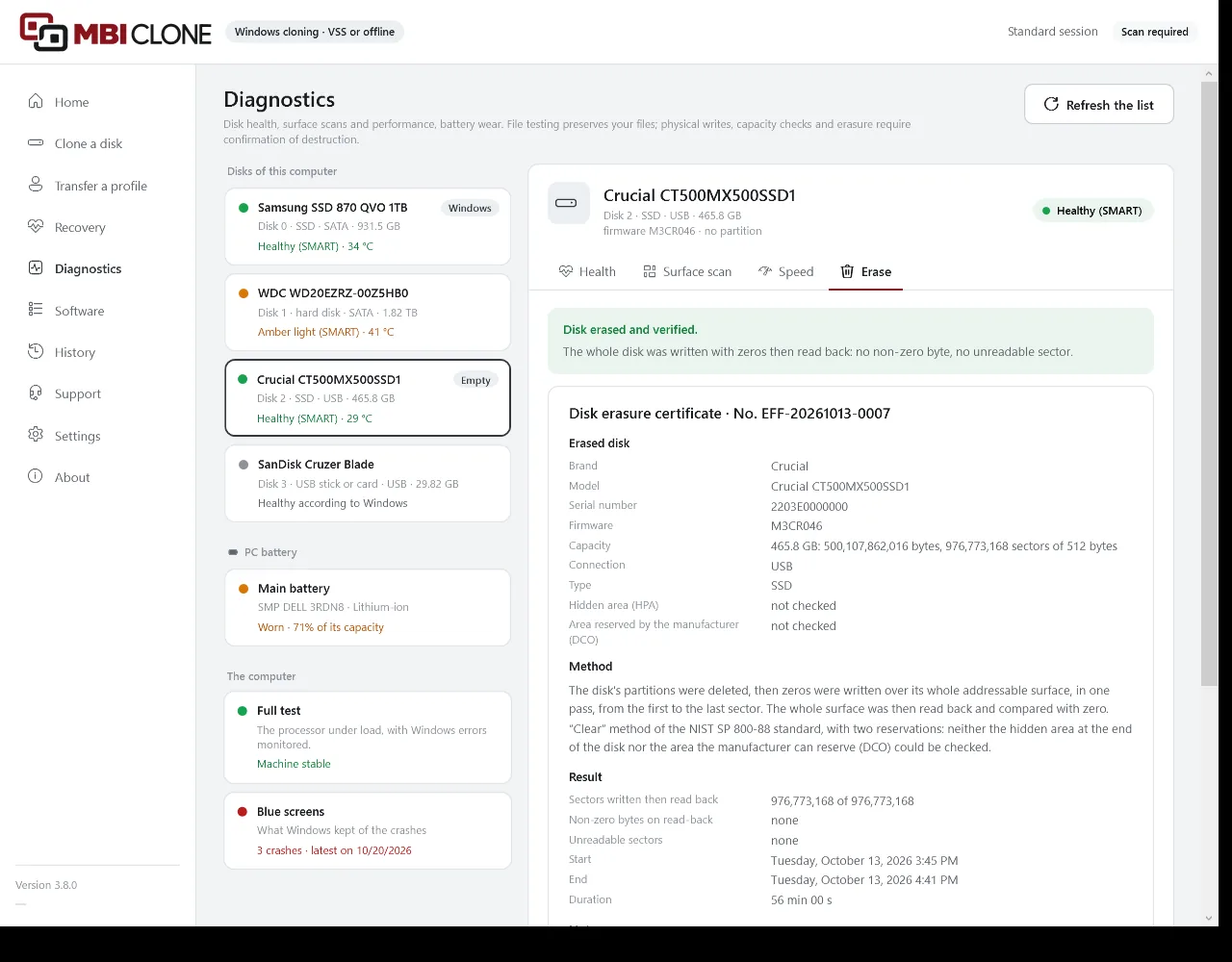
The “Erase” tab offers two actions, and a certificate to hand to the customer once the disk has been erased and read back.
- “Delete the partitions”: the disk is empty again for Windows, but its data can still be recovered.
- “Erase the disk”: the partitions are deleted, marked samples are written then read back, a pass of zeros covers the whole disk, which is then read back in full. Erasing stops on a disk that does not keep what is written to it, and the screen says how far the erasure got.
- Confirmation is one click on a button that shows the disk number and six characters of its hardware identity, for example “Erase disk 2 · A1B2C3”.
- Refused for the Windows disk, a disk protected by recovery, a disk with an amber or red light, a disk that cannot be reliably identified or a drive with no media.
- For an SSD, a USB stick or a memory card, a warning: one pass does not touch the spare cells.
- The erasure certificate, numbered, to print: the disk, the “Clear” method of the NIST SP 800-88 standard with its reservations (hidden area, area reserved by the manufacturer), the result and the dates, the workshop and the customer, and two signatures. No certificate for an erasure that was stopped or a disk that showed a fault: the screen then advises destroying it.
PC battery
Battery wear, in figures and compared.
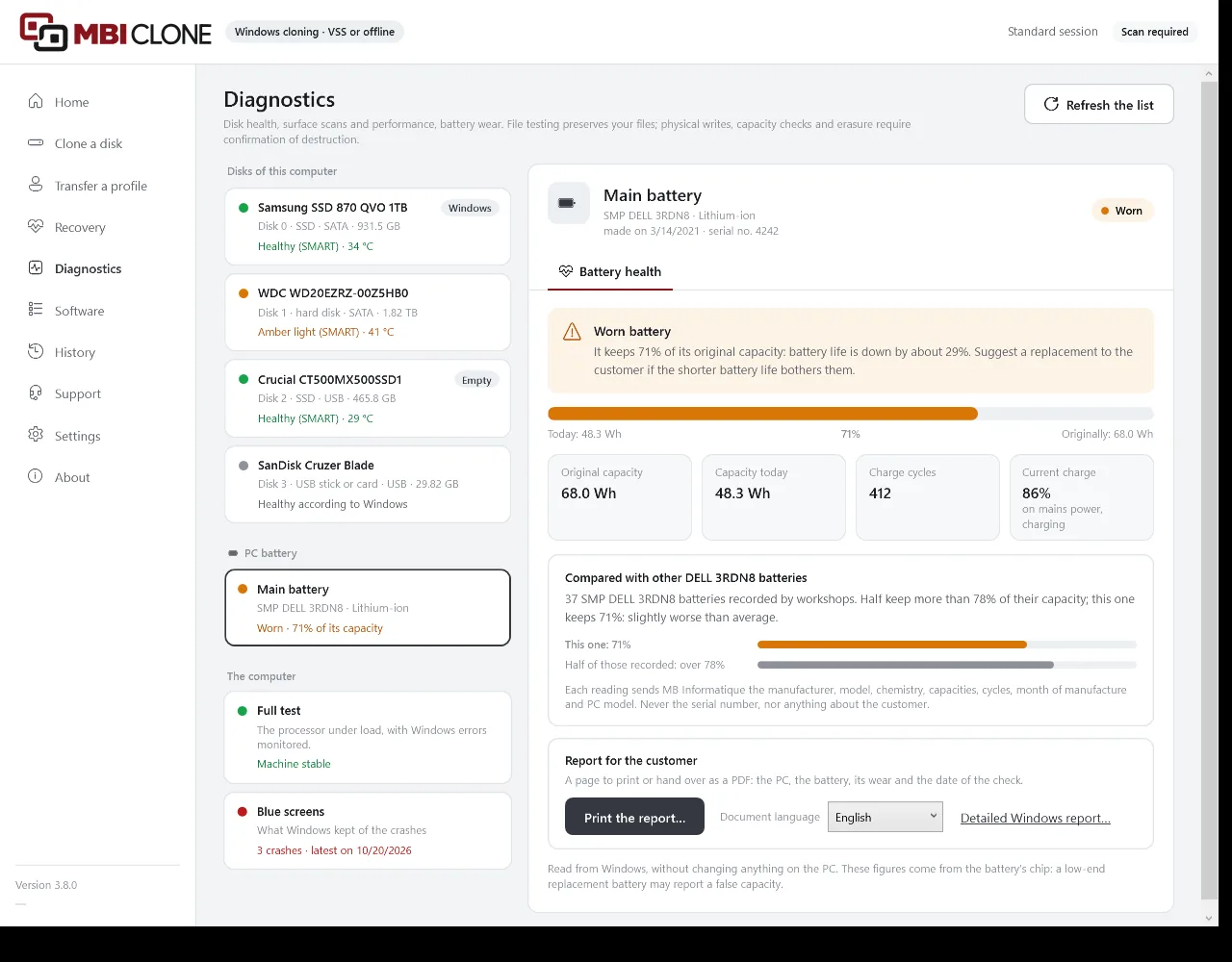
On a laptop, MBI Clone reads the battery through Windows, without changing anything: its original capacity, its capacity today, its charge cycles and its current charge.
A verdict for the customer
Green when the battery keeps at least 80% of its original capacity, amber from 60 to 79%, red below that, with a sentence to tell the customer. A UPS is shown without a verdict.
Compared with others
As soon as workshops have recorded five batteries of the same model, MBI Clone says where this one stands, for example: “Half keep more than 78% of their capacity; this one keeps 71%”.
A report to hand over
“Print the report…”: the PC, the battery, its wear and the date of the check, without the serial number. “Detailed Windows report…” also opens the report produced by Windows.
What is sent to MB Informatique
Each reading sends the battery’s manufacturer, model, chemistry, capacities, cycles and month of manufacture, and the PC model; never the serial number, nor anything about the customer. The “Share battery readings” checkbox, in the settings, turns this off.
Full test
The processor, memory and graphics card under load.
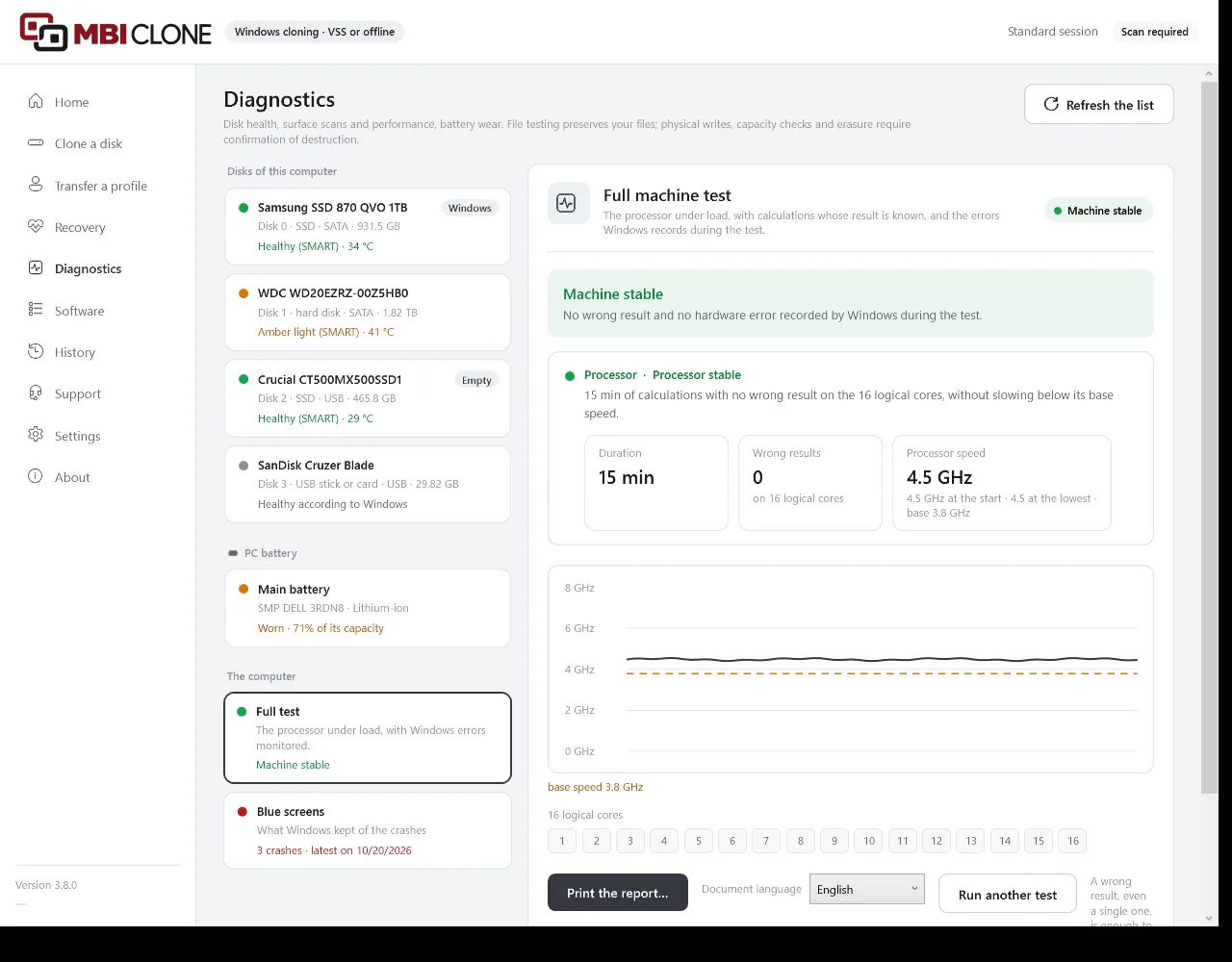
“Quick · 15 min” or “Full · 1 h”, split between the ticked parts. The test looks for a wrong result, even a single one, and for the hardware errors that Windows records in the meantime.
Processor
Calculations with a known result, on every logical core. The processor is reported as stable, slowed down when it drops below 90% of its base speed, or unstable.
RAM
Free memory is written, then read back. “Test all memory at restart…” starts the Windows test, and MBI Clone reads its result after the restart.
Graphics card
The graphics card computes at full load; a dedicated card also has its free memory tested, a card built into the processor only its computing. Overheating or slowing down turns the verdict amber; the test stops at the maximum temperature the card reports. A driver restarted by Windows is reported.
Stops at the first problem
A wrong result, a serious hardware error recorded by Windows or an unplugged charger stops the test; an error corrected by the hardware turns the verdict amber. If the PC crashes during the test, MBI Clone says so the next time it starts.
Before starting
On a laptop, the charger must be plugged in, and no other MBI Clone operation may be running. The PC is slow during the test.
The “Machine test” report
Numbered, to print for the customer: the computer (make, model, processor, memory, graphics card, without the serial number), the date, the duration, the verdict for each part, the last ten blue screens, a note, and the lines for the workshop and the customer.
Blue screens
Each blue screen explained, to the customer and to the technician alike.
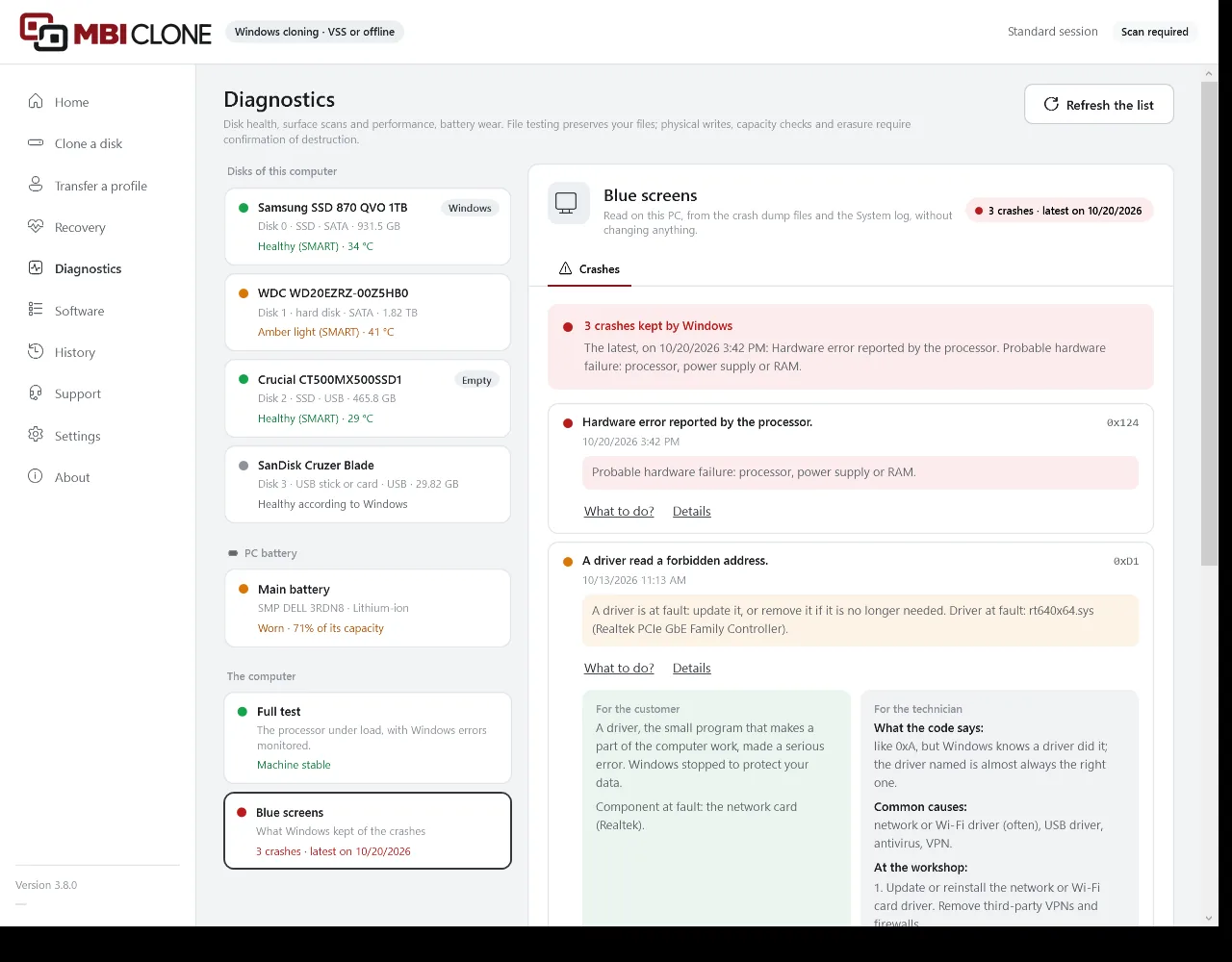
Without changing anything, MBI Clone reads the crash dump files that Windows keeps and its System log. For each crash: a sentence in plain words, the code, the driver at fault when it can be identified, and a coloured light.
What to do?
Two sections: “For the customer”, in simple words, and “For the technician”: what the code means, the common causes and what to do in the workshop. 114 codes have their own entry, and the “Blue screen lexicon” brings together the known codes and drivers.
A PC that no longer starts
“Read from a connected disk…” reads the crashes from the disk of a PC that no longer starts, connected in the workshop, without writing to it.
What is sent to MB Informatique
The code, the driver at fault and the Windows version of each crash read are counted, without the PC name or anything about the customer; the “Share the blue screens read with MB Informatique” checkbox, in the settings, turns this off. A code with no entry can be sent for analysis with “Send this code to MB Informatique”.
Documents in the customer’s language
The erasure certificate, the intake form, the battery report and the test report can be produced in French, English, German, Italian or Spanish, as chosen in “Document language”. They are saved as an HTML page and can be printed; for a PDF, open the page in a browser and print it to PDF.
Good to know
What the diagnostics do not do.
- EraseNo built-in manufacturer erase (Secure Erase, Sanitize): a single pass of zeros. The hidden area at the end of the disk is not removed, and the area reserved by the manufacturer is not read.
- Failing diskA disk with an amber or red light is neither scanned, tested nor erased: the screen suggests making a rescue image.
- Unreadable healthSMART data does not always get through a USB stick, a memory card or some USB enclosures. The self-test is not offered behind Intel RST (VMD), nor behind an enclosure that refuses it.
- Processor and memoryThe processor temperature is not read. MBI Clone tests the free memory; testing all of it is the job of the Windows test at restart.
- Graphics cardNo test over a remote desktop connection, nor of the memory of graphics built into the processor.
- Speed on a fileNTFS volumes only. This test says nothing about the disk’s capacity or surface.
- BatteryThe figures come from the battery’s chip: a low-end replacement battery may report a false capacity.
- The futureA diagnosis gives the condition on the day. Neither the verdict nor the printed documents guarantee what comes next.
See also
Data recovery
Recover files from a failing disk
A health check without reading the data, a rescue image on a workshop disk, then the files retrieved from that image, deleted files included.
- SMART health check in seconds
- Sector-by-sector image, customer’s disk protected
- Windows and Mac disks, deleted files included
Cloning
Clone Windows to a new SSD
A faithful copy of the Windows installation to a new disk. MBI Clone does not duplicate the manufacturer’s layout: it rebuilds it, then checks the partitions, file system, boot and recovery before handing the disk back to you.
- Checks before the first write
- To a larger or smaller disk
- UEFI or BIOS boot verified
Equip your workshop.
Launch price until 31 March 2027: a one-month pass at €30 excl. VAT without renewal, a monthly subscription at €30 excl. VAT or an annual subscription at €300 excl. VAT. One licence per company, with unlimited technicians, computers and migrations, and updates included.